


Running a WooCommerce store means every step of the shopping journey matters. When customers need to leave the page just to view, update, or manage their cart, that extra step can interrupt their shopping experience and make the buying process feel slower.
That’s where RenoCart comes in.
RenoCart is a powerful WooCommerce side cart plugin designed to make shopping smoother and faster. It replaces the default WooCommerce cart experience with a modern slide-out cart drawer or popup cart, allowing shoppers to manage their cart without leaving the page they are browsing.
Whether customers want to review their cart, update product quantities, remove items, or continue shopping, RenoCart keeps the cart within easy reach without sending them to a separate cart page.
Built for smooth shopping experience, RenoCart lets WooCommerce store owners add a floating cart button to every page and use a menu cart trigger to give shoppers quick access to their cart.
A Better Way to Manage the Cart
A traditional WooCommerce cart experience can add an unnecessary step to the shopping journey. When shoppers need to visit a separate cart page to review or manage their items, they have to leave the page they are currently browsing.
RenoCart brings the cart to them.
It adds a modern side cart drawer or popup cart that lets shoppers add, update, and remove products without leaving the current page or reloading it.
This means shoppers can quickly check their cart, make changes, and continue browsing without interrupting their shopping flow. When they are ready, they can move toward checkout with fewer unnecessary steps.
Why a Side Cart Makes a Difference
A traditional cart experience can add extra steps to the shopping journey. A side cart keeps cart management within reach, so shoppers can review and update their items without leaving the page they are browsing.
Keep Shoppers in the Flow
Every extra step can interrupt the shopping experience. RenoCart lets shoppers open their cart on the same page, so they can check their items and continue browsing without being sent to a separate cart page.
The Cart Is Always One Tap Away
The floating cart button stays visible in the corner of the screen, giving shoppers quick access to their cart from any page. They can open it whenever they want to review or manage their items.
Manage the Cart Without Reloading
RenoCart lets shoppers add, remove, and update products directly from the side cart. There is no need to reload the page just to make a change.
Move Toward Checkout With Fewer Steps
Shoppers can review their cart and make changes without leaving the current page. By keeping cart management close at hand, RenoCart creates a more straightforward path from browsing to checkout.

Powerful Features
RenoCart comes packed with powerful features to create a smoother, more convenient WooCommerce shopping experience.
Side Cart Drawer
Give shoppers instant access to their cart with a smooth slide-out drawer. The cart can open from the right or left, with adjustable width for desktop, tablet, and mobile. Shoppers can review and manage their items without leaving the page.
Popup Cart
Prefer a centered cart experience? Use the popup cart to display cart details in a focused overlay. It keeps the same quick cart management experience while putting the cart at the center of the screen.
Auto-Open Cart on Add to Cart
Automatically open the cart when a shopper adds a product. This provides instant confirmation and gives shoppers a clear view of what they just added. It can also be turned off for a quieter shopping experience.
Floating Cart Button With Count Badge
Keep the cart within easy reach with a floating cart button. The live count badge shows how many products are in the cart, while flexible positioning lets you place the button in a corner or along the edge of the screen. You can also hide it when the cart is empty or on specific pages.
Menu Cart Trigger & Shortcode
Add a cart icon with a count badge directly to your navigation menu. You can also display the cart trigger anywhere on your site using the [reno_menu_cart] shortcode.
Detailed Product Information
Give shoppers a clear view of every item in their cart. RenoCart displays variation attributes and highlights sale prices with the original price crossed out, along with a savings badge showing the discount percentage or amount.
Low-Stock Urgency Badge
Create a sense of urgency by displaying a low-stock badge when a product reaches a defined stock threshold. For example, shoppers can see messages such as “Only 3 left” on products that track stock.
Quantity Stepper With Undo
Make quantity changes simple with an easy-to-use stepper or direct number input. If a shopper accidentally removes an item, the undo option gives them a quick way to restore it.
Built-In Coupon Field
Let shoppers apply coupon codes directly from the cart. The coupon field can stay open or appear as a collapsible option to save space. You can also customize the coupon heading, placeholder, and button text.
Flexible Cart Summary
Control the information shown in the cart summary, including the subtotal, shipping line, and total. You can display the total as a simple price or include the amount saved. A customizable summary note can also appear below the total.
Checkout, Continue Shopping & View Cart
Give shoppers clear next steps from the cart. The checkout button can take them directly to WooCommerce checkout and optionally display the cart total. Continue Shopping and View Cart buttons can also be enabled with customizable labels and behavior.
Customizable Empty Cart State
Turn an empty cart into an opportunity to keep shoppers browsing. Customize the empty-cart heading, message, and button to guide shoppers back to your products.
Translation-Ready & GDPR Friendly
RenoCart is translation-ready and works with popular translation plugins, including WPML, Polylang, TranslatePress, and Loco Translate. It also collects no personal data from shoppers.
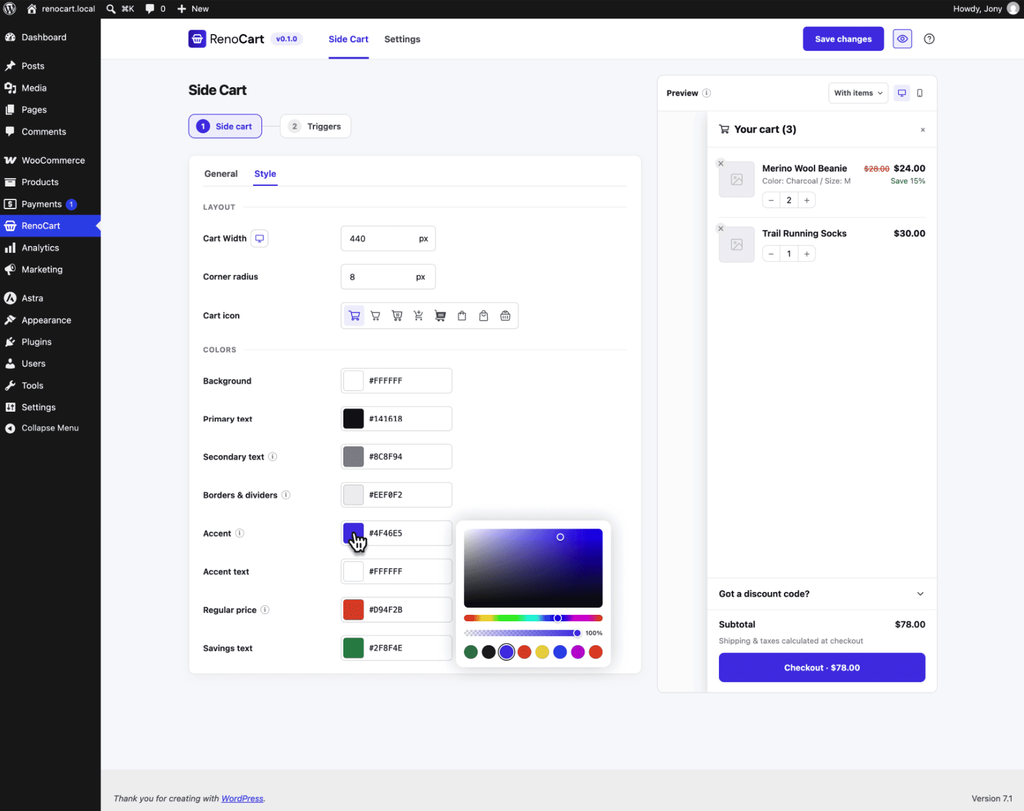
Full Styling Controls
Match the side cart and floating cart to your store’s design using the dedicated Style settings. Customize colors, buttons, and typography without writing code.
What Makes RenoCart Different?
Many WooCommerce side cart plugins may look similar at first. But after installation, users can find hidden paywalls, complicated setup processes, and unnecessary bloat.
RenoCart is built around a different approach.
Everything Is Free
There is no Pro version and no locked settings. The plugin you install includes every feature, including:
Everything is available from the beginning.
Live in Seconds
RenoCart is simple to get started with.
Just activate the plugin, and the side cart is ready to work with sensible default settings. There is no setup wizard and no code required.
Headings, colours, and triggers can be adjusted whenever needed.
Genuinely Fast
The cart opens instantly when a shopper clicks. Adding or removing products updates cart totals in real time without a page reload.
RenoCart is built on the modern WooCommerce Store API, helping keep cart data accurate and fast.
Lightweight by Design
RenoCart loads only what each page needs. It is designed without unnecessary bloat or layout shifts, helping keep Core Web Vitals healthy.
Accessible by Default
RenoCart is designed to meet WCAG 2.2 AA accessibility standards.
It includes full dialog semantics, live-region announcements, keyboard support, screen-reader announcements, and comfortable tap targets.
Wide Compatibility
RenoCart works seamlessly with WooCommerce, including Classic and Block themes, the Block Editor, and RTL layouts.
It is compatible with popular themes and page builders, including:
RenoCart is also HPOS (High-Performance Order Storage) compatible.
Get Started With RenoCart
RenoCart is the best choice to create a smoother, faster, and more enjoyable shopping experience for WooCommerce customers.
It is now available on the WordPress.org plugin repository. There is no hidden paywalls, and no complicated setup.
Simply install the plugin, activate it, and the side cart is ready to go. Give your WooCommerce store the cart it deserves.

Leave a Reply