

Don’t overwhelm readers with endless scrolling– add accordions in Gutenberg in minutes.
Your valuable content deserves better than intimidating walls of text that send visitors running. Accordions transform overwhelming content into scannable, user-friendly experiences where readers expand only what they need– dramatically improving engagement, reducing bounce rates, and making mobile browsing effortless.
In this guide, I’ll show you exactly how to add professional, functional accordions in your Gutenberg editor in minutes– no coding required. The Gutenberg Editor has completely transformed the way we build content in WordPress. With its powerful block-based approach, creating visually engaging pages is easier than ever.
Whether you’re building FAQs, product guides, or long-form content, you’ll master collapsible sections that provide visitors with a better content navigation expereince.
Let’s turn your cluttered content into organized, conversion-focused experiences.
What is an Accordion?
In essence, an accordion is a musical instrument. It features a series of keys and a bellows (a squeezable box). When a player expands and compresses the bellows while pressing the keys, air flows through the instrument to produce different sounds.
Similarly, in web design, an accordion is a user interface element that contains multiple headers with expandable and collapsible content sections. Users can click on a header to reveal or hide the associated content.
This layout allows visitors to view many questions or key pieces of information at a glance within a compact space. They can then expand only the section they’re interested in, keeping the page clean and organized.
That’s why the accordion layout in web design is named after the famous musical instrument– it mimics the same expand-and-collapse mechanism.
3 Easy Steps to Add Accordions in Gutenberg Editor
Step 1: Get Easy Accordion
Easy Accordion is the No #1 WordPress accordion plugin with the highest active users, reviews, and ratings. More than 100,000 users use Easy Accordion to create well-crafted, interactive accordions, FAQ, image accordions, and more.
Users love Easy Accordion for its robust features, easy customizations, and quick support.
Key Features:
- Ready blocks and templates
- Vertical, horizontal, and slider accordions
- WooCommerce Product FAQ accordion
- Image Accordions
- Multi-level or Nested Accordions
- Accordion from Posts & Categories
- Accordion from Custom Post Types & Taxonomies
- Many Icon Sets and Styles
- Smooth Animation & Effects
- 1900+ Google Fonts and Advanced Typography Options
- Schema markup and SEO friendly
- Many more robust features and easy customizations
Let’s install Easy Accordion and dive into the next step.
Step 2: Choose a Ready Accordion Block & Template
You have already installed and activated Easy Accordion. Now, go to where you want to add an accordion and follow the steps below to choose an accordion block and a template.
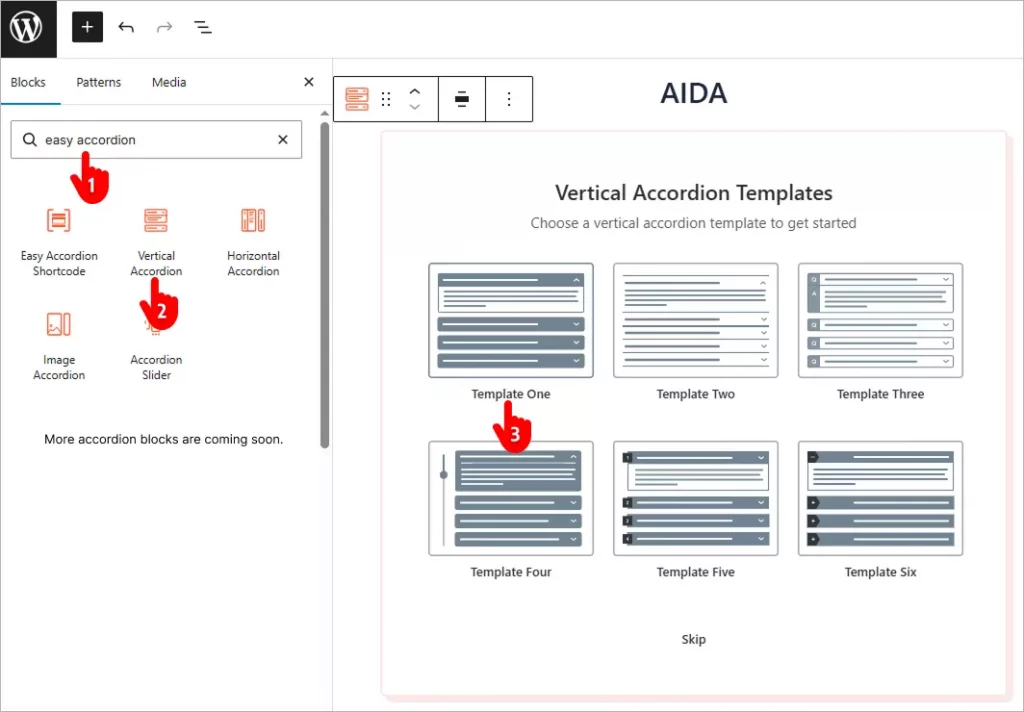
- Type “Easy Accordion” in the block search bar.
- Select the block that suits your needs perfectly. For example, I’ve selected the Vertical Accordion block.
- Choose the template that best fits your preferences. I’ve chosen the first template.
Step 3: Customize & Publish Your Accordion
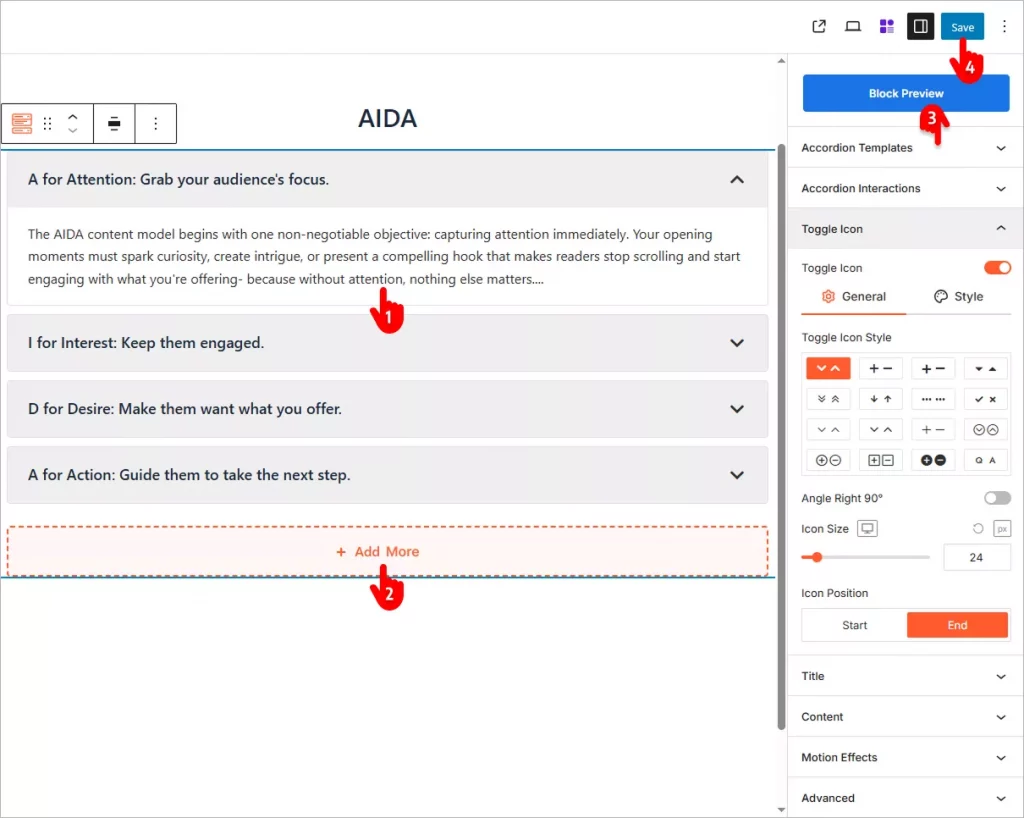
- Add your accordion content.
- Add as many accordion items as you need.
- Go to the customization panels in the right sidebar and find all the necessary options to give you total flexibility. Explore and utilize them to make the best accordions.
- Once customizations are done, save your page.
A basic accordion looks like.
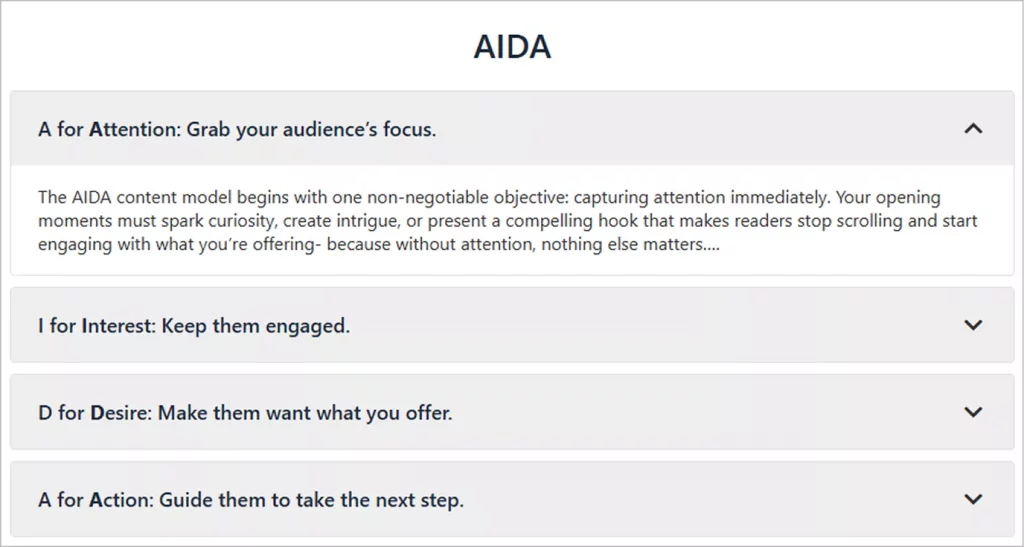
You can make it even better with your creative power and Easy Accordion’s robust features.
Key Benefits of Accordions
Dramatically Improves Content Scannability
Accordions transform overwhelming walls of text into organized, digestible sections with clear headings that let visitors quickly scan topics and expand only what interests them. This instant overview helps users find relevant information in seconds instead of abandoning your page in frustration, significantly improving user satisfaction and engagement.
Saves Space
By collapsing content into compact sections, accordions display multiple topics without consuming vertical space, keeping pages clean and uncluttered. This space efficiency is particularly crucial on mobile devices, where screen real estate is premium, allowing you to present comprehensive information without endless scrolling that exhausts mobile users.
Reduces Cognitive Overload
Presenting all information at once overwhelms visitors and triggers decision paralysis, but accordions break complex content into manageable chunks that feel approachable rather than intimidating. When users can reveal information progressively at their own pace, they process content more effectively, retain information better, and feel in control of their browsing experience.
Boosts Mobile User Experience
Mobile users face unique challenges with long-form content– tiny screens, thumb navigation, and limited patience for scrolling. Accordions solve this perfectly by creating thumb-friendly, tap-to-expand sections that feel natural on touchscreens, dramatically improving mobile engagement rates and reducing mobile bounce rates that plague text-heavy pages.
Improves Page Load Speed
Accordions can defer loading of hidden content until users expand sections, reducing initial page weight and improving Core Web Vitals scores that directly impact SEO rankings. Faster-loading pages mean better user experience, lower bounce rates, and stronger search engine performance– especially critical for content-heavy sites.
Enhances SEO with Structured Content
Search engines can still crawl and index content within accordions while you maintain a clean page presentation, giving you SEO credit for comprehensive content without overwhelming visitors. Properly implemented accordions with schema markup can even trigger rich snippets in search results, increasing click-through rates from search engine result pages.
Improves Accessibility When Done Right
Properly coded accordions with ARIA labels, keyboard navigation, and screen reader support actually enhance accessibility by providing clear content structure and navigation landmarks. Users with disabilities benefit from organized, collapsible sections that work seamlessly with assistive technologies, making your content more inclusive and compliant with accessibility standards.
Reduces Bounce Rates Significantly
When visitors land on pages and immediately see organized, scannable accordions instead of intimidating text blocks, they’re far more likely to stay and explore. Lower bounce rates signal content quality to search engines, improve your site’s overall SEO authority, and increase the likelihood of conversions as engaged visitors discover more of your offerings.
Increases Conversion Rates
By removing friction from the information-discovery process, accordions help visitors find answers to objections faster, building confidence that leads directly to conversions. E-commerce sites using accordions for product specifications, shipping details, and FAQs consistently see higher add-to-cart rates because customers get complete information without feeling overwhelmed or confused.
Accordions aren’t just aesthetic choices– they’re strategic UX tools that simultaneously improve user experience, boost engagement metrics, enhance SEO performance, and drive conversions. When implemented thoughtfully, they transform content presentation from obstacle into advantage.
Easy Accordion lets you add accordions to your WordPress site in minutes. Choose a ready template, customize how you want, and publish– no coding needed.
So, let’s add beautiful and interactive accordions to your site and boost conversions.

Leave a Reply